
As a webmaster, you probably spend hours obsessing over keyword research, backlink building, and content quality. But there is a silent killer hiding in your site architecture that can drain your SEO authority without you even noticing: Broken Links (404s).
Whether it’s an external resource that went offline, or an internal page you deleted but forgot to redirect, dead links are a massive liability. In this post, we’ll look at the technical reality of broken links and how developers can automate the auditing process.
The Technical Reality: How Google Treats 404s
Googlebot crawls the web to index pages. When it encounters a 404 error on your site, it doesn't immediately penalize you. However, it does impact your site in three specific ways:
- Wasted Crawl Budget: Google allocates a specific "crawl budget" for every website. If your internal links point to dead pages, Googlebot wastes its resources hitting those 404s instead of indexing your fresh, high-quality content.
- Link Equity Loss: If a strong page links to a 404, the "link juice" (PageRank) simply evaporates into the void. It doesn't flow to your other pages.
- User Experience: If a user clicks a link on your site and hits a dead end, they bounce. A high bounce rate signals to search engines that your site is not helpful.
Why Manual Auditing is a Trap
You cannot manually click through thousands of links on a directory site or a large blog. Traditional desktop crawlers (like Screaming Frog) are powerful, but running a heavy scan on the same server that hosts your website can cause memory exhaustion and spike your CPU, potentially crashing your site for real users.
To fix this, we need a more modern, lightweight approach. We need to offload the heavy lifting.
The Developer's Approach: Automated Dead Link Auditing
At Site Tools Box, we built a solution specifically for webmasters who don't want to crash their own servers while auditing their sites.
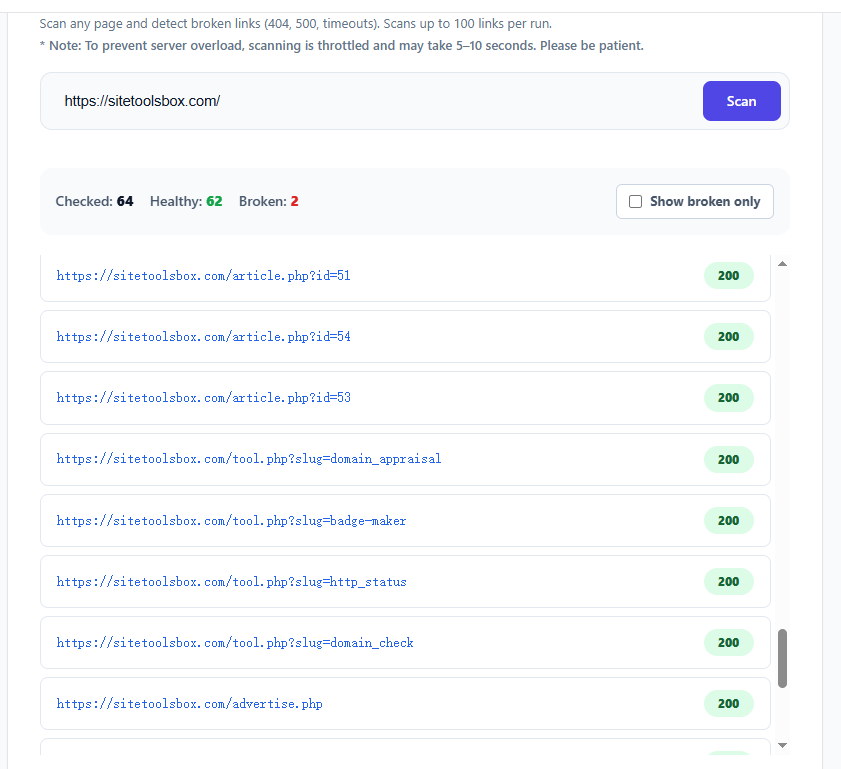
Our Dead Link Checker is built differently. Instead of relying entirely on our main PHP server to ping every single URL sequentially, it leverages edge-computing to check HTTP statuses concurrently.
- Extract & Conquer: It first parses the target URL, extracting all
<a href="...">tags from the HTML. - Concurrent Status Checks: It then sends requests in parallel (using Cloudflare Workers), checking for 404s, 500s, and timeouts without blocking the main thread.
- Readable Reports: The tool provides a clean output of Healthy (200-399) vs. Broken (400-500) links, allowing you to export and fix your code immediately.
The Best Practice for Webmasters
Don't wait for Google to de-index your site. Make dead link auditing a monthly habit. Run a scan on your homepage (and your sitemap), find the 404s, and either fix the URLs or set up 301 redirects to the correct pages.
Your SEO authority is too valuable to waste on empty links. Use our free Dead Link Checker to scan your site right now and keep your technical SEO pristine.
Need to check HTTP status codes, DNS records, or domain availability? Explore our full suite of fast, secure webmaster tools.